This flow applies when a user cannot proceed with a transaction because KYC information is required. This includes first-time users whose initial transaction requires KYC and returning users who need to satisfy additonal requirements.
It covers:
- New users above KYC free levels
- Returning users attempting a higher-risk transaction
- Users whose transaction context has changed (amount, payment method, jurisdiction)
The key signal for this flow is an eligibility response where:
paymentReady = falserequirementsis non-empty
This flow is triggered when eligibility determines that the current transaction cannot proceed without additional identity information.
Common triggers include:
- Higher transaction amounts
- Different payment methods
- Regulatory or jurisdictional requirements
- Escalation beyond previously completed KYC
Previously submitted identity information is retained and reused.
The identity is not recreated.
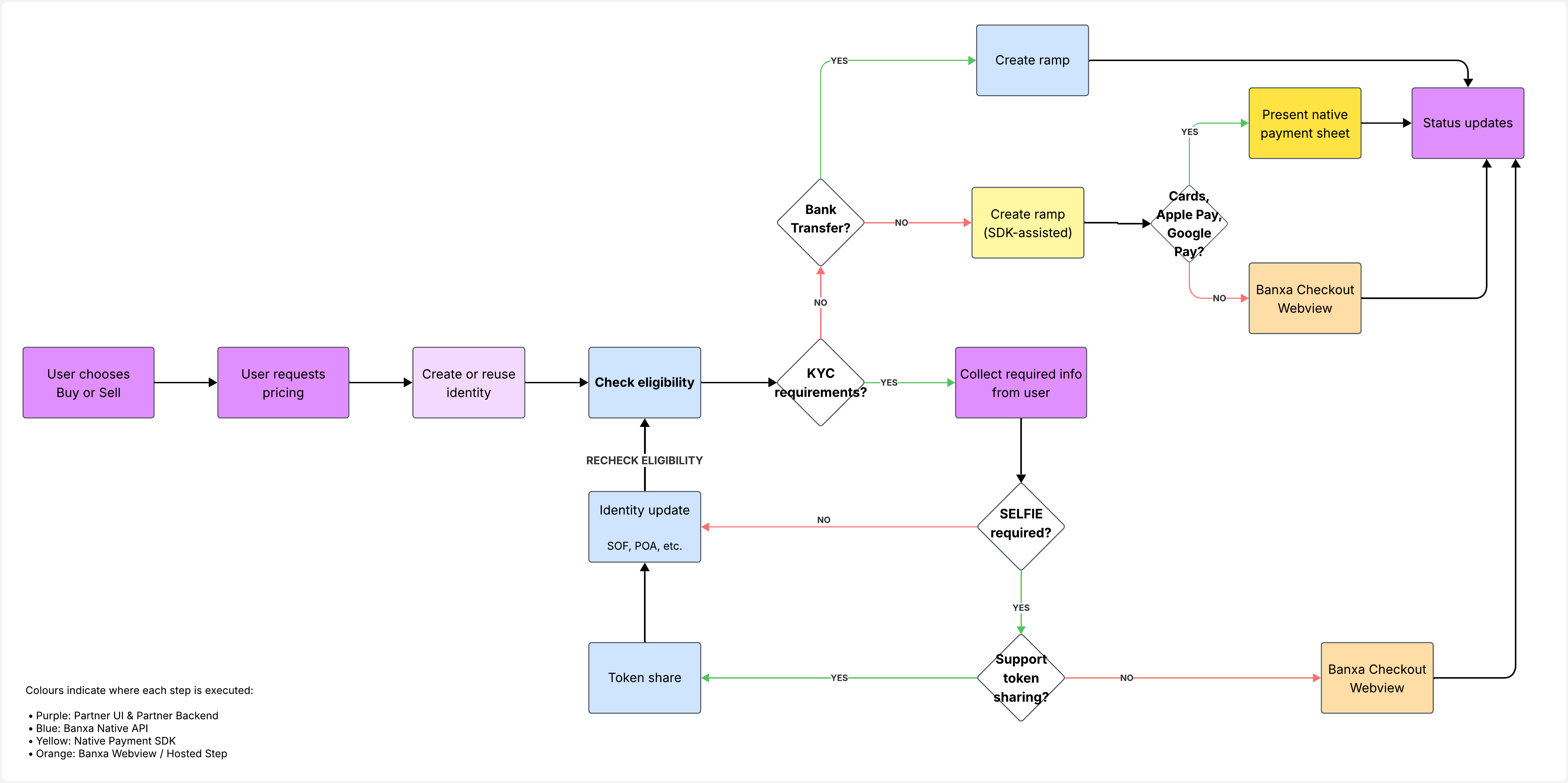
The user requests pricing or a quote for a buy or sell transaction.
This establishes the transaction context, including:
- Buy or sell direction
- Amount
- Asset pair
- Intended payment method
The partner ensures there is a persistent identityReference available to use before creating an order / ramp.
- For returning users, the existing
identityReferenceis reused. - For first-time users, an
identityReferencecan be established either by:- creating a basic identity record, or
- completing KYC provider token sharing (currently Sumsub), which links KYC results to the user’s identity.
Once established, the same identityReference is reused for eligibility checks and any subsequent identity updates. The identity must not be recreated once it exists.
The partner checks eligibility using:
identityReference- Transaction parameters (amount, payment method, jurisdiction)
Eligibility evaluates whether the transaction can proceed in its current form.
Eligibility responds with:
paymentReady = false- One or more entries in
requirements
Each requirement represents a category of information that must be satisfied before the transaction can proceed.
Examples include:
OCCUPATIONSOURCE_FUNDSPURPOSE_OF_TXDOCUMENTSELFIEPOA
Previously completed verification is not invalidated.
Only missing information is returned.
The partner is responsible for collecting the required information in their own user experience and submitting it to Banxa using the appropriate mechanism for the requirement.
Notes:
- Multiple requirements may be returned at once
- All required information can be collected in a single user interaction where possible
- The
identityReferenceis reused and must not be recreated
Banxa supports the following fulfilment mechanisms:
Update identity via API (patch identity)
Used for structured information and supported evidence submission, including:PERSONAL_DETAILSOCCUPATIONSOURCE_FUNDSPURPOSE_OF_TXTIN/US_TAX_IDDOCUMENTPOA
KYC provider token sharing (currently Sumsub)
Used when a selfie or liveness step is required:SELFIE
If a required verification step cannot be completed headlessly, a Banxa-hosted step (for example, a webview) may be required.
If multiple requirements are returned:
If
SELFIEis required, complete KYC provider token sharing first.
This may satisfy multiple verification requirements in a single step, depending on the provider configuration.Submit all remaining structured fields and supported evidence via the identity update endpoint.
After submitting the required information, the partner must re-run eligibility.
Eligibility is evaluated dynamically and may reflect:
- Verification completion
- Asynchronous checks
- Remaining unmet requirements
A successful outcome is:
paymentReady = truerequirements = []
To provide clearer visibility into verification progress, Banxa is introducing a dedicated KYC status endpoint.
This endpoint will allow partners to:
- Poll the current verification status for an identity
- Determine when KYC checks have completed
- Confirm approval before creating a ramp
Until this endpoint is available, eligibility remains the authoritative signal and should be re-checked after submitting identity information.
The KYC status endpoint will be optional and is intended to improve UX and orchestration for partners managing their own onboarding flows.
Once paymentReady = true, the partner proceeds with ramp creation using the appropriate integration path:
- Bank transfer → API-driven ramp creation
- Cards / Apple Pay / Google Pay → SDK-assisted ramp creation (for supported native mobile integrations)
- Other payment methods → fallback or hosted flow where applicable
Transaction progress is then tracked via status updates and webhooks.
- Eligibility is authoritative and should always be re-checked after identity updates
- Identity records are cumulative and must not be recreated
- Only missing information should be collected
- Re-running eligibility is recommended before proceeding